

Latest Version
Update
September 12, 2026
September 12, 2026
Developer
Mifasuse
Mifasuse
Categories
Communication
Communication
Platforms
Android
Android
Downloads
0
0
License
Free
Free
Package Name
com.mifasuse.smsforward
com.mifasuse.smsforward
Report
Report a Problem
Report a Problem
More About SMS Forward — Sync to Email
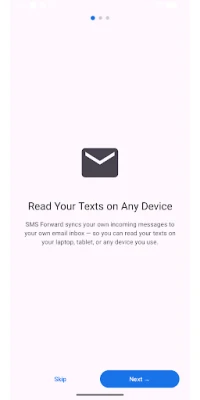
Read your text messages on every device you own.
SMS Forward is a cross-device companion that keeps your own text messages within reach no matter which screen you're at. When a message arrives on your phone, SMS Forward syncs a copy to your own email inbox — so you can read it on your laptop, tablet, second phone, or work computer without picking your phone back up.
It's your messages, going to your own inbox, on your terms.
SYNC TO YOUR OWN INBOX
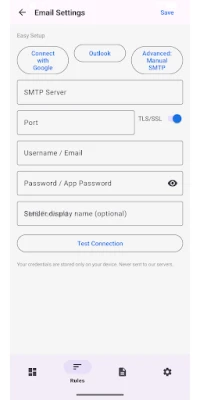
Connect your own email account — Gmail, Outlook, Yahoo, iCloud, Yandex, or any SMTP provider — and your incoming texts show up there automatically. Set it up once and read your SMS wherever you already check email. Everything is processed on your device; your message content is never sent to our servers. It goes directly to your own email provider (the third-party email service you choose and authenticate with, such as Gmail or Outlook) so you can read your messages in your inbox.
SYNC ONLY WHAT YOU WANT
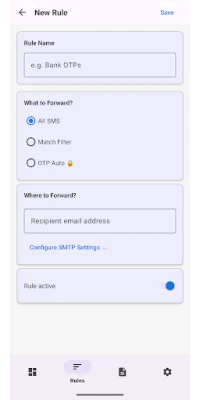
You decide which messages get synced. Create simple rules to sync everything, or narrow it down:
• Filter by sender (phone number or alphanumeric sender ID)
• Filter by keyword
• Short-code filter — sync only brief, short-lived messages, so what lands on your phone is readable on the device you are already working on
Your personal chats stay on your phone unless you choose to sync them.
RELIABLE IN THE BACKGROUND
SMS Forward runs as a foreground service so a sync isn't missed while your screen is off, and it restarts itself after a reboot. No polling a website, no manual copy-paste.
PRIVACY FIRST
• Message content is never stored on our servers
• Syncing goes directly from your phone to your own email inbox — this means your SMS content is transmitted to the email provider you choose (e.g. Gmail, Outlook, Yahoo), which is a third party, solely so you can read your own messages there
• No account, no sign-up, no cloud copy of your messages on our side
• Optional on-screen preview hiding for sensitive content
ONE PRICE, FOREVER
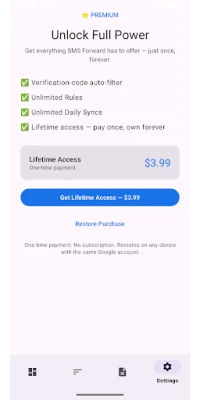
SMS Forward uses a simple $3.99 lifetime payment. No monthly subscriptions, no price increases, no dark patterns. Pay once, own it forever.
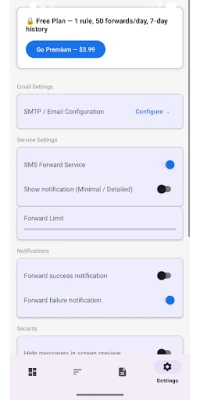
Free tier includes:
• 1 sync rule
• Email sync
• Up to 50 syncs per day
Premium ($3.99 lifetime) unlocks:
• Unlimited rules
• Unlimited daily syncs
• Short-code filter
GREAT FOR
• Reading your texts on your laptop while your phone charges in another room
• Keeping a copy of your own messages in an inbox you can search
• Staying on the device you are already working on instead of switching back to your phone
PERMISSIONS EXPLAINED
• READ_SMS / RECEIVE_SMS — required to read your incoming messages so they can be synced to the email inbox YOU choose
• INTERNET — required to deliver the sync to your email inbox
• RECEIVE_BOOT_COMPLETED — required to resume syncing after a device reboot
• FOREGROUND_SERVICE — required to sync reliably in the background
• REQUEST_IGNORE_BATTERY_OPTIMIZATIONS — optional, improves reliability on some devices
SMS Forward only reads your own incoming messages and syncs them to your own email inbox. It cannot send SMS, cannot place calls, and never delivers your messages to anyone but you. It is not affiliated with any bank or messaging service, and is not intended for accessing anyone else's messages.
It's your messages, going to your own inbox, on your terms.
SYNC TO YOUR OWN INBOX
Connect your own email account — Gmail, Outlook, Yahoo, iCloud, Yandex, or any SMTP provider — and your incoming texts show up there automatically. Set it up once and read your SMS wherever you already check email. Everything is processed on your device; your message content is never sent to our servers. It goes directly to your own email provider (the third-party email service you choose and authenticate with, such as Gmail or Outlook) so you can read your messages in your inbox.
SYNC ONLY WHAT YOU WANT
You decide which messages get synced. Create simple rules to sync everything, or narrow it down:
• Filter by sender (phone number or alphanumeric sender ID)
• Filter by keyword
• Short-code filter — sync only brief, short-lived messages, so what lands on your phone is readable on the device you are already working on
Your personal chats stay on your phone unless you choose to sync them.
RELIABLE IN THE BACKGROUND
SMS Forward runs as a foreground service so a sync isn't missed while your screen is off, and it restarts itself after a reboot. No polling a website, no manual copy-paste.
PRIVACY FIRST
• Message content is never stored on our servers
• Syncing goes directly from your phone to your own email inbox — this means your SMS content is transmitted to the email provider you choose (e.g. Gmail, Outlook, Yahoo), which is a third party, solely so you can read your own messages there
• No account, no sign-up, no cloud copy of your messages on our side
• Optional on-screen preview hiding for sensitive content
ONE PRICE, FOREVER
SMS Forward uses a simple $3.99 lifetime payment. No monthly subscriptions, no price increases, no dark patterns. Pay once, own it forever.
Free tier includes:
• 1 sync rule
• Email sync
• Up to 50 syncs per day
Premium ($3.99 lifetime) unlocks:
• Unlimited rules
• Unlimited daily syncs
• Short-code filter
GREAT FOR
• Reading your texts on your laptop while your phone charges in another room
• Keeping a copy of your own messages in an inbox you can search
• Staying on the device you are already working on instead of switching back to your phone
PERMISSIONS EXPLAINED
• READ_SMS / RECEIVE_SMS — required to read your incoming messages so they can be synced to the email inbox YOU choose
• INTERNET — required to deliver the sync to your email inbox
• RECEIVE_BOOT_COMPLETED — required to resume syncing after a device reboot
• FOREGROUND_SERVICE — required to sync reliably in the background
• REQUEST_IGNORE_BATTERY_OPTIMIZATIONS — optional, improves reliability on some devices
SMS Forward only reads your own incoming messages and syncs them to your own email inbox. It cannot send SMS, cannot place calls, and never delivers your messages to anyone but you. It is not affiliated with any bank or messaging service, and is not intended for accessing anyone else's messages.
Rate the App
Add Comment & Review
User Reviews
Based on 0 reviews
No reviews added yet.
Comments will not be approved to be posted if they are SPAM, abusive, off-topic, use profanity, contain a personal attack, or promote hate of any kind.












More »

Popular Apps

CloudMoon - Cloud GamingCloudMoon Inc.

Dragon Mania LegendsGameloft SE

Shattered Pixel DungeonShattered Pixel

Airlearn - Learn LanguagesUNACADEMY INC

Cast Web Videos to TV - iWebTVRoku Chromecast Samsung FireTV

Chatspin - Random Video ChatTalk to strangers face to face

Supernova AI Spoken English24/7 Personal AI Tutor

FlipaClip: Create 2D AnimationVisual Blasters LLC
PUBG MOBILELevel Infinite

Mochi Live TVBruno-chanrio
More »
Editor's Choice

Evernote - Note OrganizerEvernote Corporation

Zoom Workplacezoom.com

Notion: Notes, Tasks, AINotion Labs, Inc.

TikTokTikTok Pte. Ltd.

Life360: Live Location SharingLife360

Family360 - GPS Live LocatorFamily360 - GPS Locator

ClassDojoClassDojo

ABCmouse – Kids Learning GamesAge of Learning, Inc.

YouTube KidsGoogle LLC

Google Family LinkGoogle LLC
 Android
 iOS
iOS