

Latest Version
Version
1.10.58
1.10.58
Update
March 13, 2026
March 13, 2026
Developer
Kiddoware - Parental Control App Provider
Kiddoware - Parental Control App Provider
Categories
Tools
Tools
Platforms
Android
Android
Downloads
0
0
License
Free
Free
Package Name
com.kiddoware.kidsafebrowser
com.kiddoware.kidsafebrowser
Report
Report a Problem
Report a Problem
More About Kids Safe Browser – Web Filter
Kids Safe Browser: Web Filter & Custom Browser 🌐
Kids Safe Browser app provides a controlled browsing environment where you can filter websites with URL filtering and create custom rules for your needs.
Key Features for Parents 🔑
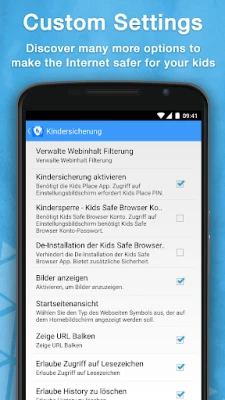
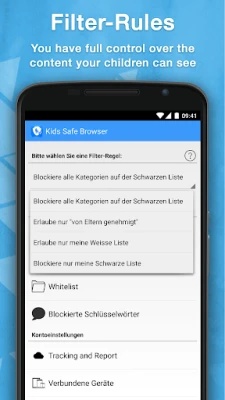
Custom Filtering: Filtering is based on website addresses (URLs/domains), not the contents of a page. Parents can block categories such as adult content or other unwanted sites.
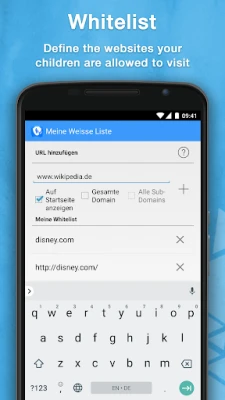
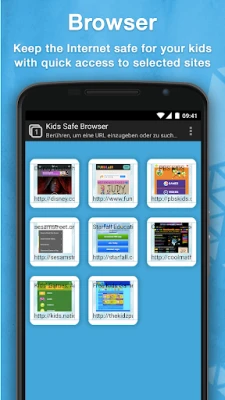
Whitelisting and Blacklisting: Add specific websites to an approved (whitelist) or blocked (blacklist) list. Whitelisted sites can be placed on the home screen for quick access.
Safe Browsing Environment: Create a kid-friendly internet space with only the sites and categories you approve.
Optional Screen Time Controls: Parents can set time limits for browsing to encourage balanced device use.
Easy Setup and Use: Simple for parents to configure and straightforward for kids to navigate.
Permissions & App Information 📲
Free Trial: A 7-day free trial gives you access to all features. After the trial, you can continue with limited free features or subscribe for full access.
Device Administrator Permission: Optional. This permission is requested to make it difficult for children to uninstall the app without a parent's permission
About the App
Kids Safe Browser is designed to support parents—not replace them. Filtering is performed on the URL or domain level, not by analyzing page content, which helps maintain privacy. The app provides parental control tools to guide safer online use, but no technology can block 100% of unwanted content. Parents should continue to supervise and discuss safe browsing habits with their children.
For full details, see our Privacy Policy http://kiddoware.com/safe-browser-privacy-policy/
Key Features for Parents 🔑
Custom Filtering: Filtering is based on website addresses (URLs/domains), not the contents of a page. Parents can block categories such as adult content or other unwanted sites.
Whitelisting and Blacklisting: Add specific websites to an approved (whitelist) or blocked (blacklist) list. Whitelisted sites can be placed on the home screen for quick access.
Safe Browsing Environment: Create a kid-friendly internet space with only the sites and categories you approve.
Optional Screen Time Controls: Parents can set time limits for browsing to encourage balanced device use.
Easy Setup and Use: Simple for parents to configure and straightforward for kids to navigate.
Permissions & App Information 📲
Free Trial: A 7-day free trial gives you access to all features. After the trial, you can continue with limited free features or subscribe for full access.
Device Administrator Permission: Optional. This permission is requested to make it difficult for children to uninstall the app without a parent's permission
About the App
Kids Safe Browser is designed to support parents—not replace them. Filtering is performed on the URL or domain level, not by analyzing page content, which helps maintain privacy. The app provides parental control tools to guide safer online use, but no technology can block 100% of unwanted content. Parents should continue to supervise and discuss safe browsing habits with their children.
For full details, see our Privacy Policy http://kiddoware.com/safe-browser-privacy-policy/
Rate the App
Add Comment & Review
User Reviews
Based on 0 reviews
No reviews added yet.
Comments will not be approved to be posted if they are SPAM, abusive, off-topic, use profanity, contain a personal attack, or promote hate of any kind.













More »

Popular Apps

Dragon Mania LegendsGameloft SE

Shattered Pixel DungeonShattered Pixel

CloudMoon - Cloud GamingCloudMoon Inc.

Cast Web Videos to TV - iWebTVRoku Chromecast Samsung FireTV

Airlearn - Learn LanguagesUNACADEMY INC

FlipaClip: Create 2D AnimationVisual Blasters LLC

Chatspin - Random Video ChatTalk to strangers face to face

Supernova AI Spoken English24/7 Personal AI Tutor

PUBG MOBILELevel Infinite

Bluetooth Keyboard & MouseAppground IO
More »
Editor's Choice

Evernote - Note OrganizerEvernote Corporation

Zoom Workplacezoom.com

Notion: Notes, Tasks, AINotion Labs, Inc.

TikTokTikTok Pte. Ltd.

Life360: Live Location SharingLife360

Family360 - GPS Live LocatorFamily360 - GPS Locator

ClassDojoClassDojo

ABCmouse – Kids Learning GamesAge of Learning, Inc.

YouTube KidsGoogle LLC

Google Family LinkGoogle LLC
 Android
 iOS
iOS